Hive 练习题解答

题目

在 Github 上面找了一些题目来练习
https://github.com/zzyb/Hive_interview-question

解答

answer
1
2
3
4
5
6
7
8
9
10
11
12
13
14
15
16
17
18
19
20
21
22
23
24
25
26
27
28
29
30
31
32
33
34
35
36
37
38
39
40
41
42
43
44
45
46
47
48
49
50
51
52
53
54
55
56
57
58
59
60
61
62
63
64
65
66
67
68
69
70
71
72
73
74
75
76
77
78
79
80
81
82
83
84
85
86
87
88
89
90
91
92
93
94
95
96
97
98
99
100
101
102
103
104
105
106
107
108
109
110
111
112
113
114
115
116
117
118
119
120
121
122
123
124
125
126
127
128
129
130
131
132
133
134
135
136
137
138
139
140
141
142
143
144
145
146
147
148
149
150
151
152
153
154
155
156
157
158
159
160
161
162
163
164
165
166
167
168
169
170
171
172
173
174
175
176
177
178
179
180
181
182
183
184
185
186
187
188
189
190
191
192
193
194
195
196
197
198
199
200
201
202
203
204
205
206
207
208
209
210
211
212
213
214
215
216
217
218
219
220
221
222
223
224
225
226
227
228
229
230
231
232
233
234
235
236
 -- 第一道面试题
-- 编写Hive的HQL语句求出连续三天登陆的用户id
select distinct user_id
from (
select user_id,
lag(login_date,1) over (partition by user_id order by login_date) prev,
login_date now,
lead(login_date,1) over (partition by user_id order by login_date) next
from login_log) t where datediff(now,prev) = 1 and datediff(next,now)=1;

-- 第一道面试题
-- 编写Hive的HQL语句求出每 个店铺的当月销售额和累计到当月的总销售额

select name,mon,monMoney,accMonMoney
from(
select name,mon,sum(monmoney) over (partition by name,mon) monMoney,
sum(monmoney) over (partition by name order by mon) accMonMoney,
row_number() over (partition by name,mon order by mon) top
from fangwen2)t where top=1;

-- 第二道面试题
-- 编写Hive的HQL语句求出每个用户截止到每月为止的最大单月访问次数和累计到该月的总访问次数
select usr,mon,num,col1 monPv,col2 maxMonPv,col3 accMonPv from(
select usr,mon,num,sum(num) over (partition by usr,mon) col1,
max(num) over (partition by usr,mon) col2,
sum(num) over (partition by usr order by mon) col3,
row_number() over (partition by usr,mon order by mon) col4 from fangwen) t where col4=1;

select usr,mon,maxPv,totalPv from(
select usr,mon,num,
max(num) over (partition by usr,mon) maxPV,
sum(num) over (partition by usr order by mon) totalPv,
row_number() over (partition by usr,mon order by mon) top
from fangwen) t where top=1;


-- 第三道面试题
-- 编写Hive的HQL语句按照day和mac分组,求出每组的销量累计总和,追加到每条记录的后面
select day,mac,color,num,
sum(num) over (partition by day,mac)
from mac;


-- TopN
-- 第六道面试题

-- 1、求出每一年的最高温度(年份,最高温度)
select t.c_year,max(t.c_temp) from (
select year(from_unixtime(unix_timestamp(substr(line,0,8),'yyyyMMdd'))) c_year,substr(line,9,2) c_temp from wendu
) t group by t.c_year;

select dt,year(dt),temp
from(
select concat_ws('-',substring(line,0,4),substring(line,5,2),substring(line,7,2)) dt,
substring(line,9,2) temp,
row_number() over (partition by substring(line,0,4) order by substring(line,9,2) DESC) top
from wendu) subT where top=1;

-- 2、求出每一年的最高温度是那一天(日期, 最高温度)

select dt,temp
from(
select concat_ws('-',substring(line,0,4),substring(line,5,2),substring(line,7,2)) dt,
substring(line,9,2) temp,
row_number() over (partition by substring(line,0,4) order by substring(line,9,2) DESC) top
from wendu) subT where top=1;

select t.c_year,t.c_date,t.c_max from
(select
year(from_unixtime(unix_timestamp(substr(line,0,8),'yyyyMMdd'))) c_year,
from_unixtime(unix_timestamp(substr(line,0,8),'yyyyMMdd')) c_date,
row_number() over(partition by year(from_unixtime(unix_timestamp(substr(line,0,8),'yyyyMMdd'))) order by substr(line,9,2) DESC) as c_rank,
substr(line,9,2) c_max
from wendu) t where t.c_rank = 1;

-- 第四道面试题
-- 求出所有数学课程成绩 大于 语文课程成绩的学生的学号
-- 方法1 case when
select * from(
select sid,
max(case course when 'yuwen' then course end) yuwen,
max(case course when 'yuwen' then score end) yuwenScore,
max(case course when 'shuxue' then course end) shuxue,
max(case course when 'shuxue' then score end) shuxueScore,
max(case course when 'yingyu' then course end) yingyu,
max(case course when 'yingyu' then score end) yingyuScore
from chengji group by sid) t where t.shuxueScore > t.yuwenScore;

-- 方法2 join
select sid,t1score yuwen,t2score shuxue from(
select * from (
select sid,course,score t1score
from chengji
where course = 'yuwen'
) t1
join (
select sid,course,score t2score from chengji where course = 'shuxue'
) t2 on t1.sid = t2.sid) t3 where t3.t2score > t3.t1score;

-- 第五道面试题
-- id_course.id id_course.course
-- 1 a
-- 1 b
-- 1 c
-- 1 e
-- 2 a
-- 2 c
-- 2 d
-- 2 f
-- 3 a
-- 3 b
-- 3 c
-- 3 e
-- 转换为
-- id a b b c d e f
-- 1 1 1 1 1 0 1 0
-- 2 1 0 0 1 1 0 1
-- 3 1 1 1 1 0 1 0

select id,
max(case course when 'a' then 1 ELSE 0 end) a,
max(case course when 'b' then 1 ELSE 0 end) b,
max(case course when 'c' then 1 ELSE 0 end) c,
max(case course when 'd' then 1 ELSE 0 end) d,
max(case course when 'e' then 1 ELSE 0 end) e,
max(case course when 'f' then 1 ELSE 0 end) f
from id_course group by id;

-- 第七道面试题
-- 1,huangbo,45,a-c-d-f
-- 2,xuzheng,36,b-c-d-e
-- 3,huanglei,41,c-d-e
-- 4,liushishi,22,a-d-e
-- 5,liudehua,39,e-f-d
-- 6,liuyifei,35,a-d-e
-- 求出每种爱好中,年龄最大的人
select id,name,maxAge,favor
from (
select id, name, max(age) over (partition by favor) maxAge, favor,
row_number() over (partition by favor order by age DESC) top
from aihao lateral VIEW explode(split(favors, '-')) t1 as favor
)t2 where top=1;
-- 列出每个爱好年龄最大的两个人,并且列出名字。
select id,name,maxAge,favor
from (
select id, name, max(age) over (partition by favor) maxAge, favor,
row_number() over (partition by favor order by age DESC) top
from aihao lateral VIEW explode(split(favors, '-')) t1 as favor
)t2 where top<=2;

-- 第十道面试题
-- 日期,产品id,产品当日收入,产品当日成本
-- 2018-03-01,a,3000,2500
-- 2018-03-01,b,4000,3200
-- 2018-03-01,c,3200,2400
-- 2018-03-01,d,3000,2500
-- 2018-03-02,a,3000,2500
-- 2018-03-02,b,1500,800
-- 2018-03-02,c,2600,1800
-- 2018-03-02,d,2400,1000
-- 2018-03-03,a,3100,2400
-- 2018-03-03,b,2500,2100
-- 2018-03-03,c,4000,1200
-- 2018-03-03,d,2500,1900
-- 2018-03-04,a,2800,2400
-- 2018-03-04,b,3200,2700
-- 2018-03-04,c,2900,2200
-- 2018-03-04,d,2700,2500
-- 2018-03-05,a,2700,1000
-- 2018-03-05,b,1800,200
-- 2018-03-05,c,5600,2200
-- 2018-03-05,d,1200,1000
-- 2018-03-06,a,2900,2500
-- 2018-03-06,b,4500,2500
-- 2018-03-06,c,6700,2300
-- 2018-03-06,d,7500,5000
-- 2018-04-01,a,3000,2500
-- 2018-04-01,b,4000,3200
-- 2018-04-01,c,3200,2400
-- 2018-04-01,d,3000,2500
-- 2018-04-02,a,3000,2500
-- 2018-04-02,b,1500,800
-- 2018-04-02,c,4600,1800
-- 2018-04-02,d,2400,1000
-- 2018-04-03,a,6100,2400
-- 2018-04-03,b,4500,2100
-- 2018-04-03,c,6000,1200
-- 2018-04-03,d,3500,1900
-- 2018-04-04,a,2800,2400
-- 2018-04-04,b,3200,2700
-- 2018-04-04,c,2900,2200
-- 2018-04-04,d,2700,2500
-- 2018-04-05,a,4700,1000
-- 2018-04-05,b,3800,200
-- 2018-04-05,c,5600,2200
-- 2018-04-05,d,5200,1000
-- 2018-04-06,a,2900,2500
-- 2018-04-06,b,4500,2500
-- 2018-04-06,c,6700,2300
-- 2018-04-06,d,7500,5000

-- 源数据3月份与4月份日利润相同,添加一条数据使其不同。
insert into goods values ('2018-04-07','d','5000','3000');

-- 1. 输出每个产品,在2018年期间,每个月的净利润,日均成本。
select d_month,profit,avgCost from (
select concat(year(dt),'-',month(dt)) d_month,name,income,cost,
(sum(income) over(partition by concat(year(dt),'-',month(dt))) -
sum(cost) over(partition by concat(year(dt),'-',month(dt)))) profit,
avg(cost) over(partition by concat(year(dt),'-',month(dt))) avgCost,
row_number() over (partition by concat(year(dt),'-',month(dt)) order by name) top
from goods where year(dt) = '2018') t_month where t_month.top=1;

-- 2. 输出每个产品,在2018年3月中每一天与上一天相比,成本的变化。
select
dt,cost,
(cost - LAG(cost,1,cost) over(partition by concat(year(dt),'-',month(dt)) order by dt))
from goods where concat(year(dt),'-',month(dt)) = '2018-3';

-- 3. 输出2018年4月,有多少个产品总收入大于22000元,必须用一句SQL语句实现,且不允许使用关联表查询、子查询。
select concat(year(dt),'-',month(dt)),name,sum(income) sumIncome
from goods where concat(year(dt),'-',month(dt)) = '2018-4'
group by name,concat(year(dt),'-',month(dt)) having sumIncome>22000;

-- 4. 输出2018年4月,总收入最高的那个产品,每日的收入,成本,过程使用over()函数。
select g.dt,maxT.name,maxT.maxIncome,g.income,g.cost from(
select name,totalIncome,max(totalIncome) over() maxIncome from(
select
dt,name,income,cost,
sum(income) over (partition by name) totalIncome
from goods where concat(year(dt),'-',month(dt)) = '2018-4') t limit 1
) maxT join goods g on maxT.name=g.name where concat(year(dt),'-',month(dt)) = '2018-4';


Hbase Shell 常用操作

help

1
help 'create'

hbase shell 操作

HBase是没有schema的,就是在创建表的时候不需要指定表中有哪些列,只需要指定有多少个列蔟

1
2
# 创建订单表,表名为ORDER_INFO,该表有一个列蔟为C1
create "ORDER_INFO","C1"
1
2
# 查看表
list
1
2
3
4
5
# 删除表
# 1.disable "TableName"
# 2.drop "TableName"
disable "ORDER_INFO"
drop "ORDER_INFO"

增删改查

1
2
3
4
5
6
7
8
9
10
11
12
13
14
15
16
17
18
19
20
21
22
23
24
25
26
27
28
29
30
31
32
33
34
35
36
37
38
39
40
41
42
43
44
45
46
47
48
49
50
51
52
53
54
55
56
57
58
59
60
61
62
# 添加一条数据
# put '表名','ROWKEY','列蔟名:列名','值'
# 数据示例
# ID STATUS PAY_MONEY PAYWAY USER_ID OPERATION_DATE CATEGORY
# 000001 已提交 4070 1 4944191 2020-04-25 手机
put "ORDER_INFO", "000001", "C1:STATUS", "已提交"
put "ORDER_INFO", "000001", "C1:PAY_MONEY", 4070
put "ORDER_INFO", "000001", "C1:PAYWAY", 1
put "ORDER_INFO", "000001", "C1:USER_ID", "4944191"
put "ORDER_INFO", "000001", "C1:OPERATION_DATE", "2020-04-25"
put "ORDER_INFO", "000001", "C1:CATEGORY", "手机"

# 查询数据
# get 查询一行数据
# get '表名',‘ROWKEY’
get 'ORDER_INFO','000001'

# 正确显示中文
get "ORDER_INFO", "000001", {FORMATTER => 'toString'}

# 显示多版本
get 'cx_table_stu01','20200001',{COLUMNS=>'cf1',VERSIONS=>5}
# 如果只能显示一个版本,查看表结构的version是不是为1
desc 'cx_table_stu01'

# 除了列(COLUMNS)修饰词外HBase还支持
# Limit(限制查询结果行数)
# STARTROW (ROWKEY起始行。会先根据这个key定位到region,再向后扫描)
# STOPROW(结束行)
# TIMERANGE(限定时间戳范围)
# VERSIONS(版本数)
# FILTER(按条件过滤行)

# 更新数据
# put '表名','ROWKEY','列蔟名:列名','更改值'
# 将订单ID为000001的状态,更改为「已付款」
put "ORDER_INFO","000001", "C1:STATUS", "已付款"

# 删除数据
# 删除列
# 如果有多个版本只会删除当前版本
# delete "表名", "ROWKEY", "列蔟名:列名"
# 将订单ID为000001的状态列删除。
delete "ORDER_INFO", "000001", "C1:STATUS"

# 删除行
# deleteall '表名','ROWKEY'
# 将订单ID为000001的信息全部删除(删除所有的列)
deleteall "ORDER_INFO", "000001"

# 增加/删除列族
# 增加
# alter '表名', '列族名'
alter 'Student', 'teacherInfo'

# 删除
# alter '表名', {NAME => '列族名', METHOD => 'delete'}
alter 'Student', {NAME => 'teacherInfo', METHOD => 'delete'}

# 修改表
# alter '表名',{name=>"列族",要修改的内容=>xxx}
alter 'PERSON3',{NAME=>'cf1', VERSIONS=>5}

删除数据的时候,其实 HBase 不是真的直接把数据删除掉,而是给某个列设置一个标志,然后查询数据的时候,有这个标志的数据,就不显示出来
什么时候真正的删除数据呢?

  • 后台进程,专门来执行删除数据的操作

执行 delete 的时候

  • 如果表中的某个列有对一个的几次修改,它会删除最近的一次修改
  • 默认是保存 1 个保存的时间戳
  • 有一个 version 属性

计数器

数据量小/测试环境中计数

1
2
3
# 统计表行数
# count "表名"
count "ORDER_INFO"

count 执行效率非常低,适用于百万级以下的小表 RowCount 统计

数据量大/生成环境中计数

利用 hbase.RowCounter 包执行 MR 任务

  • 启动yarn集群
  • 启动mr-historyserver
1
2
# 在 shell 中执行
hbase org.apache.hadoop.hbase.mapreduce.RowCounter '表名'

扫描操作

scan操作

1
2
3
4
5
6
7
8
9
10
11
12
13
14
15
16
17
18
19
20
# 全表扫描:scan "表名"(慎用,效率很低)
# 查询订单所有数据
scan "ORDER_INFO", {FORMATTER => 'toString'}

# 只查询列族”cf1”
scan 'cx_table_stu01',{COLUMNS=>'cf1'}
# 只查询列族”cf1”下的”name”信息
scan 'cx_table_stu01',{COLUMNS=>'cf1:name'}

# 限定只显示多少条: scan "表名", {LIMIT => XXX}
# 查询订单数据(只显示3条)
scan "ORDER_INFO", {FORMATTER => 'toString', LIMIT => 3}

# 指定查询某几个列: scan "表名", {LIMIT => XXX, COLUMNS => []}
# 只查询订单状态以及支付方式,并且只展示3条数据
scan "ORDER_INFO", {FORMATTER => 'toString', LIMIT => 3, COLUMNS => ['C1:STATUS', 'C1:PAYWAY']}

# 根据ROWKEY来查询:scan "表名", {LIMIT => XXX, COLUMNS => [], ROWPREFIXFILTER => 'ROWKEY'}
# 使用scan来根据rowkey查询数据,也是查询指定列的数据
scan "ORDER_INFO", {ROWPREFIXFILTER => '02602f66-adc7-40d4-8485-76b5632b5b53',FORMATTER => 'toString', LIMIT => 3, COLUMNS => ['C1:STATUS', 'C1:PAYWAY']}

过滤器

其实在hbase shell中,执行的ruby脚本,背后还是调用hbase提供的Java API

官方文档:https://hbase.apache.org/devapidocs/index.html

使用方法

1
2
3
4
5
# 查看内置过滤器
show_filters

# 示例
scan '表名',{Filter => "过滤器(比较运算符, '比较器表达式')"}
1
2
3
# 使用 RowFilter 查询指定订单ID的数据
# 查询订单的ID为:02602f66-adc7-40d4-8485-76b5632b5b53、订单状态以及支付方式
scan "ORDER_INFO", {FILTER => "RowFilter(=,'binary:02602f66-adc7-40d4-8485-76b5632b5b53')", COLUMNS => ['C1:STATUS', 'C1:PAYWAY'], FORMATTER => 'toString'}

RowFilter

通过上图,可以分析得到,RowFilter过滤器接受两个参数,

  • op——比较运算符

  • rowComparator——比较器

所以构建该Filter的时候,只需要传入两个参数即可

1
2
3
4
5
# 查询状态为「已付款」的订单
scan "ORDER_INFO",{FILTER => "SingleColumnValueFilter('C1', 'STATUS', = , 'binary:已付款')",COLUMNS => ['C1:STATUS','C1:PAYWAY'],FORMATTER => 'toString'}

# 查询支付方式为1,且金额大于3000的订单
scan "ORDER_INFO",{FILTER => "SingleColumnValueFilter('C1', 'PAYWAY', = , 'binary:1') AND SingleColumnValueFilter('C1', 'PAY_MONEY', > , 'binary:3000')",COLUMNS => ['C1:STATUS','C1:PAYWAY','C1:PAY_MONEY'],FORMATTER => 'toString'}

HBase shell中比较默认都是字符串比较,所以如果是比较数值类型的,会出现不准确的情况

例如:在字符串比较中4000是比100000大的

rowkey 过滤器

RowFilter 实现行键字符串的比较和过滤
PrefixFilter rowkey前缀过滤器
KeyOnlyFilter 只对单元格的键进行过滤和显示,不显示值
FirstKeyOnlyFilter 只扫描显示相同键的第一个单元格,其键值对会显示出来
InclusiveStopFilter 替代 ENDROW 返回终止条件行

列过滤器

FamilyFilter 列簇过滤器
QualifierFilter 列标识过滤器,只显示对应列名的数据
ColumnPrefixFilter 对列名称的前缀进行过滤
MultipleColumnPrefixFilter 可以指定多个前缀对列名称过滤
ColumnRangeFilter 过滤列名称的范围

值过滤器

ValueFilter 值过滤器,找到符合值条件的键值对
SingleColumnValueFilter 在指定的列蔟和列中进行比较的值过滤器
SingleColumnValueExcludeFilter 排除匹配成功的值

其他过滤器

ColumnPaginationFilter 对一行的所有列分页,只返回 [offset,offset+limit] 范围内的列
PageFilter 对显示结果按行进行分页显示
TimestampsFilter 时间戳过滤,支持等值,可以设置多个时间戳
ColumnCountGetFilter 限制每个逻辑行返回键值对的个数,在 get 方法中使用
DependentColumnFilter 允许用户指定一个参考列或引用列来过滤其他列的过滤器

比较器

比较器 描述
BinaryComparator 匹配完整字节数组
BinaryPrefixComparator 匹配字节数组前缀
BitComparator 匹配比特位
NullComparator 匹配空值
RegexStringComparator 匹配正则表达式
SubstringComparator 匹配子字符串

比较器表达式

比较器 表达式语言缩写
BinaryComparator binary:值
BinaryPrefixComparator binaryprefix:值
BitComparator bit:值
NullComparator null
RegexStringComparator regexstring:正则表达式
SubstringComparator substring:值

累加器(INCR)

incr可以实现对某个单元格的值进行原子性计数。语法如下:

incr ‘表名’,’rowkey’,’列蔟:列名’,累加值(默认累加1)

如果某一列要实现计数功能,必须要使用incr来创建对应的列

使用put创建的列是不能实现累加的

1
2
3
4
5
6
7
8
9
10
11
12
13
14
15
16
# 通过 scan/get 无法直接查看cnt
hbase(main):004:0> scan "NEWS_VISIT_CNT", {FORMATTER => 'toString', LIMIT => 3}
ROW COLUMN+CELL
0000000001_00:00-01:00 column=C1:CNT, timestamp=2021-11-19T23:12:42.890, value=

0000000001_00:00-01:00 column=C1:TIME_RANGE, timestamp=2021-11-19T23:12:43.153, value=00:00-01:00
0000000002_01:00-02:00 column=C1:CNT, timestamp=2021-11-19T23:12:42.907, value=

0000000002_01:00-02:00 column=C1:TIME_RANGE, timestamp=2021-11-19T23:12:43.165, value=01:00-02:00
0000000003_02:00-03:00 column=C1:CNT, timestamp=2021-11-19T23:12:42.912, value={
0000000003_02:00-03:00 column=C1:TIME_RANGE, timestamp=2021-11-19T23:12:43.171, value=02:00-03:00
3 row(s)
Took 0.1625 seconds
# 需要使用 get_counter
# get_counter '表','ROWKEY',"列蔟名:列名"
get_counter 'NEWS_VISIT_CNT','0000000020_01:00-02:00','C1:CNT'
1
2
3
# 对0000000020新闻01:00 - 02:00访问计数+1
# incr '表','ROWKEY',"列蔟名:列名"
incr 'NEWS_VISIT_CNT','0000000020_01:00-02:00','C1:CNT'

实用命令

1
2
3
4
5
6
7
8
9
10
11
12
13
14
15
16
17
18
19
20
21
22
23
# 显示服务器状态
status

# 显示HBase当前用户
whoami

# 查看表结构
describe 'TableName'

# 查看表是否存在
exists 'TableName'

# 查看表是否禁用/启用
is_enabled 'TableName'
is_disabled 'TableName'

# 新增列蔟
alter 'TableName', 'C3'
# 删除列蔟
alter 'TableName', 'delete' => 'C3'

# 清空表数据
truncate 'TableName'

执行 hbase shell 脚本

1
2
# hbase shell 'script file path'
hbase shell ~/ORDER_INFO.txt

tips

web默认端口16010

hive HQL 常用操作

资料

https://blog.csdn.net/u013411339/article/details/120795941

远程连接hive

https://blog.csdn.net/qq_44065303/article/details/105820435

服务端要开启 hiveserver2

建表方式

1
2
3
4
5
6
7
8
9
10
11
12
-- 1.正常建表
-- 建表后无数据
create table tableName(col1 int,col2 int);

-- 2.查询建表 as
-- 建表后有数据,数据为查询结果
-- 并不会带原表的分区(分区丢失),包扣一些字段的约束等
create table tableName as select * from tableA;

-- 3.结构建表 like
-- 建表后无数据,表结构从 tableA 中复制
create table tableName like tableA;

函数查询

1
2
3
4
5
6
7
8
9
10
11
12
-- 查看内置函数
SHOW FUNCTIONS;

-- 查看month相关的函数
SHOW FUNCTIONS LIKE '*month*';

-- 查看函数用法
DESC FUNCTION function_name;

-- 查看 add_months 函数的详细说明并举例
DESC FUNCTION EXTENDED add_months;

CTE

1
2
3
4
-- 公用表表达式
-- 创建一个临时结果集
with tableName as (select * from tableB)
select * from tableName;

时间转换函数

1
2
3
4
5
6
7
8
9
10
11
12
13
14
15
16
17
18
19
20
21
22
23
24
25
26
27
28
29
30
31
32
33
34
35
36
37
38
语法: unix_timestamp()
返回值: bigint
说明: 获得当前时区的UNIX时间戳
hive> select unix_timestamp() from tableName;
1616906976


语法: from_unixtime(bigint unixtime[, string format])
返回值: string
说明: 转化UNIX时间戳(从1970-01-01 00:00:00 UTC到指定时间的秒数)到当前时区的时间格式
hive> select from_unixtime(1616906976,'yyyyMMdd') from tableName;
20210328

语法: unix_timestamp(string date)
返回值: bigint
说明: 转换格式为"yyyy-MM-dd HH:mm:ss"的日期到UNIX时间戳。如果转化失败,则返回0
hive> select unix_timestamp('2021-03-08 14:21:15') from tableName;
1615184475

语法: unix_timestamp(string date, string pattern)
返回值: bigint
说明: 转换pattern格式的日期到UNIX时间戳。如果转化失败,则返回0
hive> select unix_timestamp('2021-03-08 14:21:15','yyyyMMdd HH:mm:ss') from tableName;
1615184475

语法: to_date(string timestamp)
返回值: string
说明: 返回日期时间字段中的日期部分。
hive> select to_date('2021-03-28 14:03:01') from tableName;
2021-03-28

语法: year(string date)
返回值: int
说明: 返回日期中的年。
hive> select year('2021-03-28 10:03:01') from tableName;
2021
hive> select year('2021-03-28') from tableName;
2021

日期函数

1
2
3
4
5
6
7
8
9
10
11
12
13
14
15
16
17
语法: datediff(string enddate, string startdate)
返回值: int
说明: 返回结束日期减去开始日期的天数。
hive> select datediff('2020-12-08','2012-05-09') from tableName;
213

语法: date_add(string startdate, int days)
返回值: string
说明: 返回开始日期startdate增加days天后的日期。
hive> select date_add('2020-12-08',10) from tableName;
2020-12-18

语法: date_sub (string startdate, int days)
返回值: string
说明: 返回开始日期startdate减少days天后的日期。
hive> select date_sub('2020-12-08',10) from tableName;
2020-11-28

窗口函数

窗口聚合函数

sum

1
2
3
4
5
-- 共4种用法
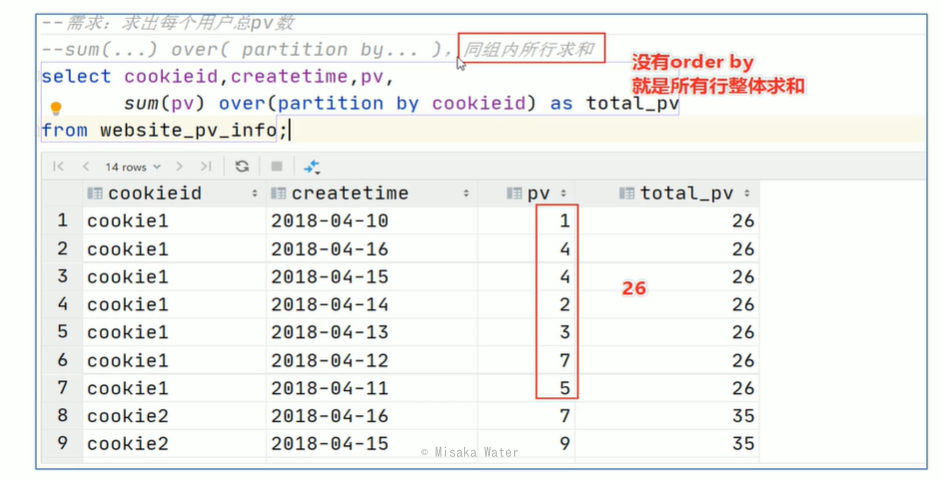
sum(...) over() -- 相当于对全表进行求和
sum(...) over(order by ...) -- 连续累积求和,排序,不分组
sum(...) over(partition by ...) -- 同组内所行求和,只分组不排序
sum(...) over(partition by ... order by ...) -- 在每个分组内,连续累积求和,分组+排序

partition by

partition by

order by

order by

窗口表达式

窗口表达式提供了一种控制行范围的能力如往前,往后n行

可以写多个列

1
2
3
4
5
6
7
8
9
10
11
12
13
14
15
16
-- 默认从第一行到当前行
sum(...) over(partition by ... order by ...)
sum(...) over(partition by ... order by ... , ...) -- 按多列分区
sum(...) over(partition by ... order by ... rows between unbounded preceding and current row)

-- 向前3行至当前行
sum(...) over(partition by ... order by ... rows between 3 preceding and current row)

-- 向前3行,向后1行
sum(...) over(partition by ... order by ... rows between 3 preceding and 1 following)

-- 当前行到最后一行
sum(...) over(partition by ... order by ... rows between current row and unbounded following)

-- 第一行至最后一行,即分组内所有行
sum(...) over(partition by ... order by ... rows between unbounded preceding and unbounded following)

窗口排序函数

1
2
3
4
-- row_number家族,在每个分组中,为每行分配一个从1开始的唯一序号
row_number -- 不考虑重复
rank -- 考虑重复,挤占后续位置
dense_rank -- 考虑重复,不挤占后续位置
1
2
3
4
5
6
7
-- 窗口排序函数 ntile
将每个分组内的数据分为指定的若干个桶内,并且为每一个桶分配一个桶编号

select cookieid,createtime,pv
ntile(3) over(partition by cookieid order by createtime)
from website_pv_info
order by cookieid,createtime;

抽样函数

随机抽样 random

随机,但是速度慢

1
2
select * from website_pv_info order by rand() limit 2;
select * from website_pv_info distribute by rand() sort by rand() limit 2;

block 抽样

速度快,但是不随机

1
2
3
4
5
6
-- 按行数抽样
select * from website_pv_info tablesample (1 rows);
-- 根据数据大小百分比抽样
select * from website_pv_info tablesample (50 percent);
-- 根据数据大小抽样,支持b,k,m,g
select * from website_pv_info tablesample (1B);

bucket table 基于分桶表抽样

速度快+随机

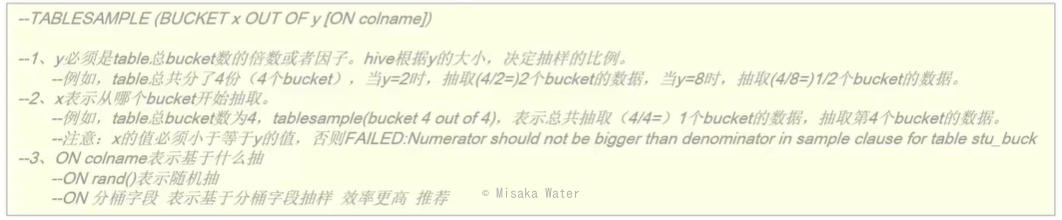
tablesample(BUCKET x OUT OF y [ON colname])
tablesample

1
2
3
-- 根据整行数据进行抽样
select * from website_pv_info tablesample ( bucket 1 out of 2 on rand());

类型转换

1
2
3
4
5
6
7
8
9
-- CAST可以转换的类型
-- 1.隐式类型转换规则如下
-- (1)任何整数类型都可以隐式地转换为一个范围更广的类型,如 TINYINT 可以转换成 INT,INT 可以转换成 BIGINT。
-- (2)所有整数类型、FLOAT 和 STRING 类型都可以隐式地转换成 DOUBLE。
-- (3)TINYINT、SMALLINT、INT 都可以转换为 FLOAT。
-- (4)BOOLEAN 类型不可以转换为任何其它的类型。
CAST('1' AS INT) -- 可以正常执行
CAST('X' AS INT) -- 执行失败返回 NULL

concat 函数

1
2
3
4
5
6
7
8
9
10
11
12
13
14
15
16
-- CONCAT 函数用于将多个字符串连接成一个字符串。
-- CONCAT(str1,str2,…)
SELECT CONCAT(id,',',name) AS con FROM info LIMIT 1;返回结果为
+----------+
| con |
+----------+
| 1,BioCyc |
+----------+

-- CONCAT_WS() 指定参数之间的分隔符
SELECT CONCAT_WS('_',id,name) AS con_ws FROM info LIMIT 1;
+----------+
| con_ws |
+----------+
| 1_BioCyc |
+----------+

case when

1
2
3
4
5
6
7
8
9
-- 简单 case
CASE sex
WHEN '1' THEN '男'
WHEN '2' THEN '女'
ELSE '其他' END
-- 搜索 case
CASE WHEN sex = '1' THEN '男'
WHEN sex = '2' THEN '女'
ELSE '其他' END

UDTF(explode)和侧视图

1
2
3
4
5
6
7
8
9
10
11
12
13
14
15
16
17
18
19
20
-- explode 
-- 接收 array 和 map 转换成多行
select explode(`array`(1,2,3,4,5));
-- Result:
-- col
-- 1
-- 2
-- 3
-- 4
-- 5
select explode(`map`("name","xxx",'sex','男','age','13'));
-- Result:
-- key value
-- name xxx
-- sex 男
-- age 13

-- 侧视图结合 explode
-- 侧视图语法
select ... from tableA lateral view UDTF(xxx) 表别名 as 列别名1,列别名2,列别名3;

行列转换

1
2
3
4
5
6
7
8
9
10
11
12
13
14
15
16
17
18
19
20
21
22
23
24
25
26
27
28
29
30
31
32
33
34
35
36
37
38
39
40
41
42
43
44
45
46
47
48
49
50
51
52
53
54
55
56
57
58
59
60
61
62
63
64
65
66
67
68
69
70
71
72
73
74
75
76
77
78
79
80
81
82
83
84
85
86
87
88
89
90
91
92
93
94
95
96
97
98
99
100
101
102
103
104
105
106
107
108
109
110
111
112
113
-- 多行转多列
-- 利用case when
-- 原表
-- students.id students.name students.subject students.score
-- 1 小明 语文 87
-- 2 张三 语文 27
-- 3 王五 语文 69
-- 4 李四 语文 99
-- 5 小明 数学 86
-- 6 马六 数学 33
-- 7 李四 数学 44
-- 8 小红 数学 50
-- 转换后
-- name chinese math
-- 小明 87 86
-- 小红 0 50
-- 张三 27 0
-- 李四 99 44
-- 王五 69 0
-- 马六 0 33

select name,
max(case subject when '语文' then score else 0 end) chinese,
max(case subject when '数学' then score else 0 end) math
from students group by name;

-- 多行转单列
-- 转换前
-- cookie.cookieid cookie.createtime cookie.pv
-- cookie1 2015-04-11 5
-- cookie1 2015-04-12 7
-- cookie1 2015-04-10 1
-- cookie1 2015-04-13 3
-- cookie1 2015-04-14 2
-- cookie1 2015-04-15 4
-- cookie1 2015-04-16 4
-- cookie2 2015-04-10 2
-- cookie2 2015-04-11 3
-- cookie2 2015-04-12 5
-- cookie2 2015-04-13 6
-- cookie2 2015-04-14 3
-- cookie2 2015-04-15 9
-- cookie2 2015-04-16 7
-- 转换后
-- cookieid createtimes pvs
-- cookie1 ["2015-04-10","2015-04-11","2015-04-12","2015-04-13","2015-04-14","2015-04-15","2015-04-16"] [1,5,7,3,2,4,4]
-- cookie2 ["2015-04-10","2015-04-11","2015-04-12","2015-04-13","2015-04-14","2015-04-15","2015-04-16"] [2,3,5,6,3,9,7]


select cookieid,collect_list(createtime) createtimes,collect_list(pv) pvs from cookie group by cookieid;
-- 其他函数
COLLECT_LIST(col) -- 多行合并成一行,不去重
COLLECT_SET(col) -- 多行合并成一行,将某字段的值进行去重汇总
CONCAT([string|col],[string|col],[string|col],....) -- 返回输入字符串连接后的结果,支持任意个输入字符串
CONCAT_WS('分隔符',[array|map]) -- 指定分隔符


-- 多列转多行
-- 主要使用 union 关键字
-- 转换前
-- rows2cols.col1 rows2cols.col2 rows2cols.col3 rows2cols.col4
-- a 1 2 3
-- b 4 5 6
-- 转换后
-- _u1.col1 _u1.col2 _u1.col3
-- a c 1
-- a d 1
-- a e 1
-- b c 4
-- b d 4
-- b e 4

select col1,'c' as col2,col2 as col3 from rows2cols
union all
select col1,'d' as col2,col2 as col3 from rows2cols
union all
select col1,'e' as col2,col2 as col3 from rows2cols;

-- 单列转多行
-- 转换前
-- aihao.id aihao.name aihao.age aihao.favors
-- 1 huangbo 45 a-c-d-f
-- 2 xuzheng 36 b-c-d-e
-- 3 huanglei 41 c-d-e
-- 4 liushishi 22 a-d-e
-- 5 liudehua 39 e-f-d
-- 6 liuyifei 35 a-d-e
-- 转换后
-- id name age favorslist
-- 1 huangbo 45 a
-- 1 huangbo 45 c
-- 1 huangbo 45 d
-- 1 huangbo 45 f
-- 2 xuzheng 36 b
-- 2 xuzheng 36 c
-- 2 xuzheng 36 d
-- 2 xuzheng 36 e
-- 3 huanglei 41 c
-- 3 huanglei 41 d
-- 3 huanglei 41 e
-- 4 liushishi 22 a
-- 4 liushishi 22 d
-- 4 liushishi 22 e
-- 5 liudehua 39 e
-- 5 liudehua 39 f
-- 5 liudehua 39 d
-- 6 liuyifei 35 a
-- 6 liuyifei 35 d
-- 6 liuyifei 35 e

select id,name,age,t.col1 as favorsList from aihao lateral VIEW explode(split(favors,'-')) t as col1;

-- lateral VIEW + explode

常见案例

查看前百分之N

1
2
3
4
5
6
7
8
9
10
11
/*
NTILE(n):把有序分区中的行分发到指定数据的组中,各个组有编号,编号从1开始,对于每一行,NTILE返回此行所属的组的编号。注意:n必须为int类型
ntile(n)和where sorter = m 构成 n/m,如:ntile(2)和where sorted = 1 构成显示所有列的1/2
20% = 1/5 ==> ntile(5),where sorted = 1
*/
SELECT *
FROM (
SELECT name, orderdate, cost, NTILE(5) OVER (ORDER BY orderdate DESC) sorted
FROM business
) t
WHERE sorted = 1;

TOPN 问题

1
2
3
select * from (
select ROW_NUMBER() over(partition by ... order by ... DESC) as rank from tableName
) t where t.rank < 3;

与前一天相比

1
2
3
4
5
LAG(列名,前几行,'默认值')
LAG(name, 1)
LAG(name, 1,'default')
-- 表示取前一条记录的name的值。
-- LEAD()函数与此类似,不过它是查询某字段的后N条记录的值。

连续登录/连续问题

连续登录/连续问题

1
2
3
4
5
6
7
8
9
10
11
12
13
14
15
16
17
18
19
20
21
22
23
24
25
26
27
28
29
30
31
32
33
34
35
36
37
38
39
40
41
42
43
44
45
46
47
48
49
50
51
52
53
54
55
56
57
58
-- 原数据
1,2020-01-01
1,2020-01-02
1,2020-01-07
1,2020-01-08
1,2020-01-09
1,2020-01-10
2,2020-01-01
2,2020-01-02
2,2020-01-03
2,2020-01-04
3,2020-01-02
3,2020-01-03
3,2020-01-04

-- 两种方案
-- 1.自连接,构建笛卡尔积
-- 2. 窗口函数

-- 自连接
-- 两天的连续登录问题使用自连接比较好做,大于2天不适合用自连接
-- 1.自连接
select a.user_id a_id,a.login_date a_dt,
b.user_id b_id,b.login_date b_dt
from login_log a,login_log b;

-- 2.查找用户id相同并且时间差为1的记录
select *
from (
select a.user_id a_id,a.login_date a_dt,
b.user_id b_id,b.login_date b_dt
from login_log a,login_log b
) t where t.a_id=t.b_id and datediff(t.a_dt,t.b_dt)=1;
-- 提取id,并去重
select distinct t1.a_id
from (
select *
from (
select a.user_id a_id,a.login_date a_dt,
b.user_id b_id,b.login_date b_dt
from login_log a,login_log b
) t where t.a_id=t.b_id and datediff(t.a_dt,t.b_dt)=1) t1;


-- 窗口函数
-- 适合于连续N天的问题

select distinct user_id from (
select user_id,login_date,
date_add(login_date,4-1) as nextday,
lead(login_date,4-1) over (partition by user_id order by login_date) as nextlogin
from login_log
) t where nextday = nextlogin;

-- nextday,手动算出 N 天后的时间
-- nextlogin,向下取 N 行进行验证


级联/累加求和

1
2
3
4
5
6
7
8
9
10
11
12
13
14
15
16
17
18
19
20
21
22
23
24
25
26
27
28
29
30
31
32
33
34
35
36
37
38
-- 编写Hive的HQL语句求出每个用户截止到每月为止的最大单月访问次数和累计到该月的总访问次数
-- 原表
usr,mon,num
A,2015-01,5
A,2015-01,15
B,2015-01,5
A,2015-01,8
B,2015-01,25
A,2015-01,5
A,2015-02,4
A,2015-02,6
B,2015-02,10
B,2015-02,5
A,2015-03,16
A,2015-03,22
B,2015-03,23
B,2015-03,10
B,2015-03,11
-- 两种方法
-- 1.group by 加自连接
-- 2.窗口函数

-- 1.group by 加自连接
-- 过于复杂,不写了
-- https://www.bilibili.com/video/BV1L5411u7ae?p=126

-- 方法2
-- 窗口函数

-- 关键点是
sum(num) over (partition by usr order by mon) accPV

with t as (
select usr,mon,num,
row_number() over (partition by usr,mon order by num DESC) top,
sum(num) over (partition by usr order by mon) accPV
from fangwen
)select usr,mon,num,accPV from t where top=1;

EFCore数据库反向工程

之前的大数据比赛取消了,就去弄了另外一个项目。

程序是师兄写的,但是后台数据库不见了,只能自己生成一个数据库来测试,有一个特点是程序运行时会自动生成空的数据表,这样就不用很麻烦的对着java的代码复现数据表结构(ef真香),在写爬虫找数据的时候就想着,能不能用程序把这些表变成实体类呢,网上找了一番,找到了解决方法就重新整理一下记录下了。

源链接:https://www.cnblogs.com/qidakang/p/11302327.html

打开VS,新建一个工程,然后安装如下的包

反向MySQL数据库就安装:

1
2
3
4
MySql.Data.EntityFrameworkCore
Pomelo.EntityFrameworkCore.MySql
Microsoft.EntityFrameworkCore.Tools
Microsoft.VisualStudio.Web.CodeGeneration.Design

反向SqlServer数据库就安装:

1
2
3
4
Microsoft.EntityFrameworkCore
Microsoft.EntityFrameworkCore.SqlServer
Microsoft.EntityFrameworkCore.Tools
Microsoft.VisualStudio.Web.CodeGeneration.Design

安装好后打开[程序包控制台],接着输入

MySQL版本:

1
2
3
4
第一次生成实体类:
Scaffold-DbContext "Server=127.0.0.1;port=3306;Database=db; User=root;Password=root;"Pomelo.EntityFrameworkCore.MySql -OutputDir Models
更新实体类:
Scaffold-DbContext "Server=127.0.0.1;port=3306;Database=db; User=root;Password=root;" Pomelo.EntityFrameworkCore.MySql -OutputDir Models -Force

SqlServer版本:

1
2
3
4
第一次生成实体:
Scaffold-DbContext "Server=127.0.0.1;port=3306;Database=db; User=root;Password=root;"Microsoft.EntityFrameworkCore.SqlServer -OutputDir Models
更新实体类:
Scaffold-DbContext "Server=127.0.0.1;port=3306;Database=db; User=root;Password=root;"Microsoft.EntityFrameworkCore.SqlServer -OutputDir Models -Force

运行后会多出一个Models文件夹,里面就是这个数据库的所有表